
Unauthorized Macintosh Laptops: The Rise and Fall of Outbound Systems
How a small Colorado based company created the first proper Macintosh laptop

Introduction
The field of unauthorized Macintosh clones is a fascinating one to study. Prior to Apple’s brief flirtation with authorizing clones in the mid-1990s, there were a small number of determined companies that sought to create a legal-proof Macintosh clone.
Today, most of these efforts are not only forgotten, but don’t even rate a mention in the various tech history books covering Apple. Which is a shame, since these companies all tried very hard, and usually very cleverly, to create something that ran the Macintosh operating system, without actually being a Macintosh.
I will warn that the subject of this article, Outbound Systems, has been a hard one to nail details down. Although it’s not quite as bad as NuTek, a number of details relating to how Outbound Systems functioned, how their Macintosh clone systems worked with the Macintosh OS, and their interactions and negotiations with Apple, are shrouded in mystery.
I have done the best job I can to find the facts, and make it clear when I am citing a fact versus citing an educated guess. Its a fascinating story, and I hope you enjoy reading it as much as I enjoyed researching it.
Building a Macintosh Clone
How do you make a Macintosh clone? In the late 1980s and early 1990s, Apple was aggressively against allowing any company to produce Macintosh clones, so any would-be cloner had to find a way to pull it off without giving Apple a legal opening to sue them into bankruptcy.
From the outset, the Macintosh was viewed as an impressive achievement, and had an influence far beyond its disappointing sales (especially for the original Macintosh).
There would definitely be a market for a company that succeeded in bringing the sleek and polished Macintosh operating system to additional form factors beyond Apple’s own offerings, and/or gave people the ability to run the Macintosh operating system on a far more affordable computer.
However, the biggest stumbling block was the need for the routines and APIs insdie of the Macintosh ROM. Whereas IBM PCs had a BIOS, a comparatively small ROM that a determined engineer or two could reverse engineer in a matter of months (as was repeatedly proven by PC clonemakers), the Macintosh ROM was a vastly different beast.
It was significantly larger for one thing, with the original Macintosh’s (and the 512k followup) ROM being 64k in size, split between two chips, ROM HI and ROM LOW.1 Followup Macintoshes had larger ROMs, the 1986 Macintosh Plus’s ROM was 128k, the 1987 Macintosh SE doubled that to 256k, and by the end of the decade some Macintosh models had 512k ROMs.2
The Macintosh operating system depended on the routines and APIs in these ROMs, and there were a lot of them, especially when compared to the simple and limited functions and system calls in an IBM PC’s BIOS that DOS would call. If you wanted to build a Macintosh clone, you needed these ROMs, or you needed to duplicate their functionality.
Several different approaches were tried by various companies trying to create a legal-proof Macintosh clone.
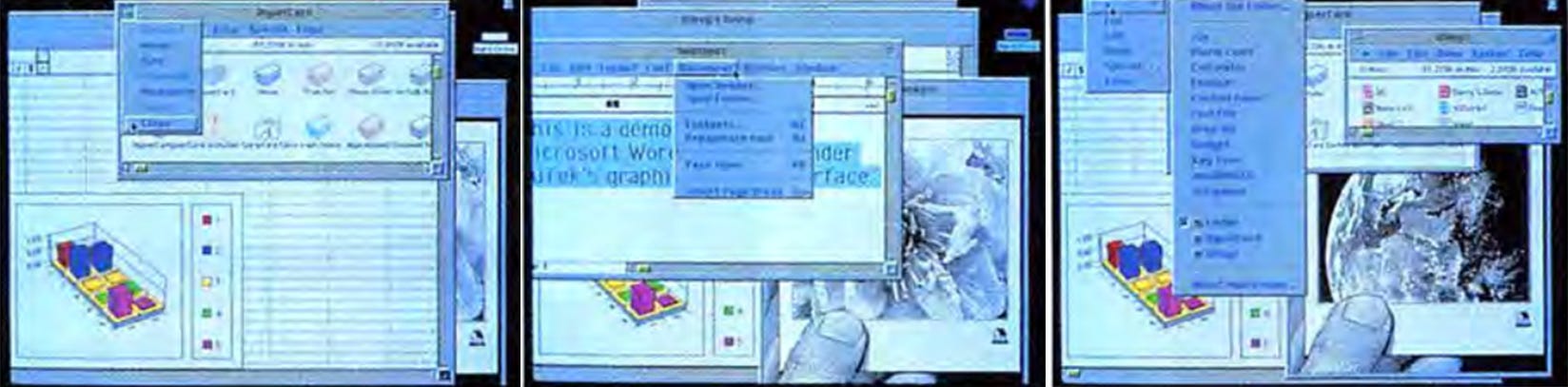
There was the absolute insanity of a company called NuTek, who sought to reverse-engineer the Macintosh operating system (System 6 to be precise) from scratch, creating an entire operating system that ran Macintosh applications but wasn’t actually a Macintosh.
Their goals were a bit too unrealistic too actually happen, but they did come far closer than you would expect and their story (which I’ve already covered, click here to read) is well worth the read.
There was also a short-lived company called Cadmus Computer Systems, who successfully reverse-engineered part-of the Macintosh operating system, creating a Unix workstation that ran something called Cadmac in 1985.
This was a (apparently clean-room, since Apple didn’t sue) implementation of the Macintosh operating system’s graphics APIs, that replicated a lot of the look-and-feel of the Macintosh GUI and allowed a Cadmac-equipped system to run at least some Macintosh applications.
Granted, Cadmac ran only under Unix, so it wasn’t really threatening Apple’s install base of Macintoshes. Still, the technology was apparently legal-proof, and thus Apple decided to throw money at the problem, acquiring Cadmus Computer Systems and quietly burying both it and Cadmac.3
Its irrelevant, but Cadmac did live on for a couple years with existing installations, with a 1988 article from InfoWorld covering an application called Intermedia (actually it was a suite of applications, all networked together over Ethernet, sharing text and graphics together in a hypertext environment built on top of a database) that was originally developed on IBM RT systems running Unix 4.2 and Cadmac.4
Intermedia was eventually migrated to Apple’s own A/UX implementation of Unix, but it got its start in 1984 under Cadmac.
Rather than trying to reverse-engineer the Macintosh Toolbox in a legally-defensible manner, a far easier way of creating a Macintosh-clone was to put together hardware that could run the Macintosh operating system, but avoid trying to reverse-engineer the Macintosh ROM itself. Instead you would use a legitimate Macintosh ROM to actually run the Macintosh operating system in a way that was lawyer-proof.
Companies such as Dynamic and Colby Computers created luggable Macintosh clones by buying entire Macintosh systems from Apple, ripping them apart to remove the motherboard (with its precious Apple ROMs) and disk drive, throwing everything else away, and then repackaging the motherboard and disk drive into a new luggable format.
This had several drawbacks, as not only did the final cost have to represent the expense of buying and destroying an entire Macintosh computer for each clone made, but also the final units would be heavy even by contemporary standards, since they were built around heavy desktop motherboards rather than custom ones.
Another way of creating a legal-proof Macintosh clone was to outsource the acquisition of those precious and irreplaceable ROMs to the customer, placing the burden on them rather than the would-be Macintosh cloner.
As one example, in the early 1990s there was a company called Hydra Systems, who built a PC AT expansion card called the ANDOR ONE. This was a board that required the user to supply a Macintosh ROM of some sort, and then allowed a PC AT to run Macintosh software fast somewhere around the speed of the aging Mac Classic.5
Not exactly blazingly fast, but if you really wanted to play with MacPaint on your PC AT, Hydra Systems had you covered.
This was also the tactic that the subject of this article, Outbound Systems, chose to use.
But before diving into their story, let’s talk about just exactly why companies saw such potential in bringing a portable Macintosh clone to the market. This primarily stemmed from the abysmal failure of Apple’s first portable, 1989’s Macintosh Portable.
The Woeful Macintosh Portable
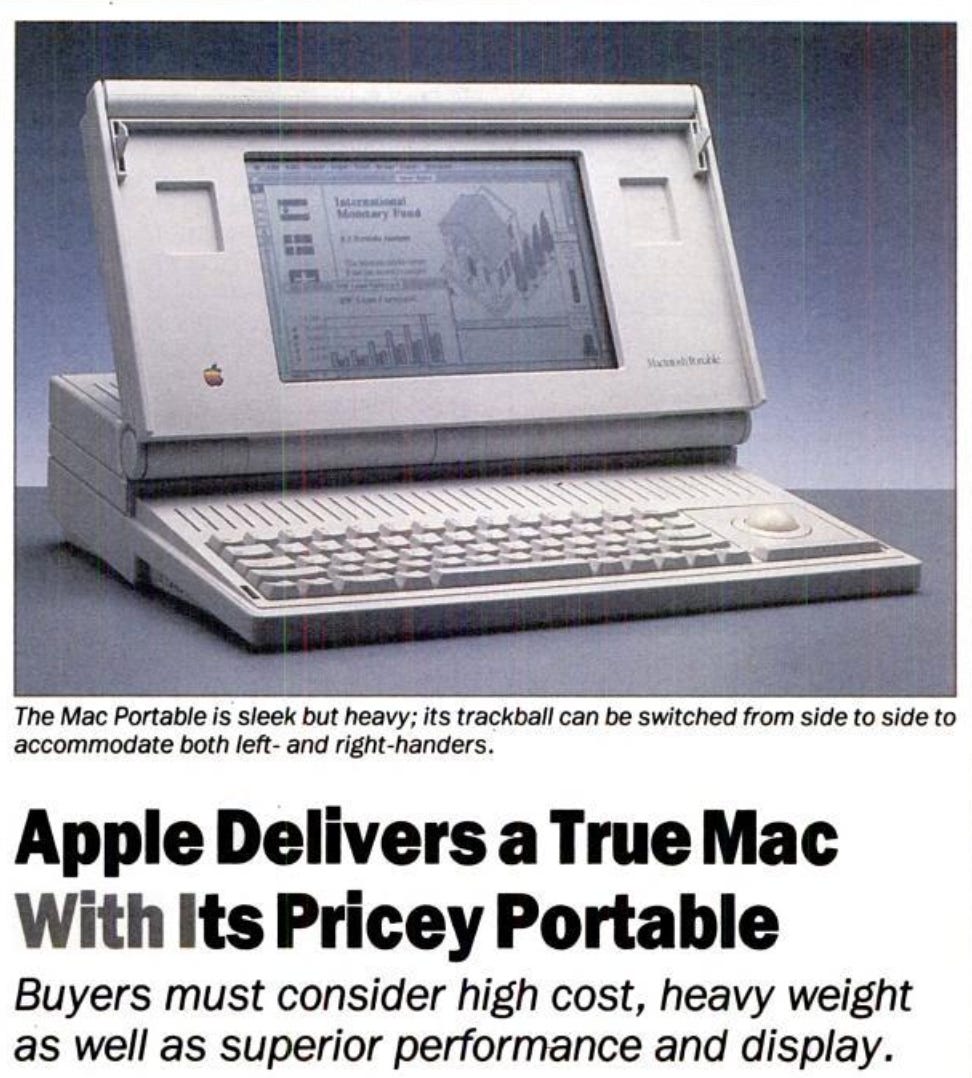
Apple finally released the very first Macintosh luggable in late 1989, something that Macintosh fans had been craving for years. The MS-DOS portable market was in full swing, with a wide variety of of innovative and creative form factors and configurations all jostling for space.
And yet the Macintosh was still desktop bound, and there was no easy way to take its crisp GUI and ease-of-use on the road with you. Your MacWrite and MacPaint masterpieces of composition weren’t overly portable.But that all changed in the fall of 1989 with the release of the Mac Portable.
Apple’s first portable offering (no the original Macintosh’s carrying handle doesn’t count) was basically the Twentieth Anniversary Macintosh, just a bit over a decade early. So…the Thirteenth Anniversary Macintosh?
In other words, it was a sleek (at least for 1989) and highly advanced piece of hardware that had more bells and whistles than you could shake a stick at, was extremely powerful, had one of the best LCD screens you could get, and was a real beast in every regard, spec-wise.
Unfortunately it was also incredibly heavy, incredibly expensive, and its technological reach kind of exceeded its technological grasp, in spite of Apple’s best efforts.
Initially the Macintosh Portable cost a whopping 5,799 dollars for the floppy drive only variant, and an even more painful 6,499 dollars for one that added a 40 MB hard drive.
Adding an additional 1 MB of RAM cost 649 dollars, and the entire configuration weighed in around 16 pounds, which really strained the definition of “portable”.
It did have a high quality trackball for controlling the mouse, swappable between the left and right sides of the keyboard for maximum convenience. Or you could remove it entirely and put a numpad in its place (which also could presumably be on either side of the keyboard), although this would require using an external mouse.
As a sidetone: remember that this external mouse would have been an old-school roller mouse, one that was far from friendly to use on anything other than a mousepad. Granted, the Portable was hardly something you would curl up on the couch with, it was usually going to be used at a desk or table.
Everything about the Portable was no-compromise, it was a powerhouse of a system with all of the polish that Apple could bring to it. It came with multiple manuals (including one for the included Hypercard installation), with InfoWorld being particularly impressed by the Macintosh Portable Handbook, whose 92 pages were neatly divided into nine sections, each with its own color coded tab.6
It used an enhanced version of the Macintosh SE’s ROM, had a 16 MHz Motorola 68k CPU (double the speed of the SE), and even had a Processor Direct Slot (PDS) that expansion boards could use to directly interface with the CPU.
But all of this power came at a cost, not just the high price but also the massive weight and clunky enclosure. A battery life of most of a day sounded nice in theory, but since it was achieved by using two pounds of lead-acid batteries…yes literally an eighth of the Mac Portable’s entire weight was comprised of its heavy batteries. The Portable also had a standard 9-volt battery to preserve data while the main batteries (yes the battery pack was removable) were swapped.
Just as a fun fact, the 2015 13” MacBook Air weighs in at a svelte 2.7 pounds, meaning the Macintosh Portable had most of a MacBook Air just in the battery compartment.
By 1991 the Portable’s failure was very clear, with MacWorld columnist Steven Levy wiring it off as a “pathetic version of a portable computer--a bulky overpriced beast”.7
The large price and back-breaking weight meant that the Portable, for all its power and performance (in certain areas it was almost twice as fast as an SE), sold poorly.
What the Macintosh market wanted was something lighter and cheaper, something that didn’t require taking out a second mortgage to buy. Apple didn’t seem to have anything in the works, apart from some revisions to the Portable that didn’t fix any of its underlying issues.
And this is where companies such as Outbound stepped up. If Apple wouldn’t give people the laptop they were looking for, maybe a nimble and creative third party could do it. And this is where Outbound Systems enters the picture, with a laptop that had a creative solution to the requirement for a Macintosh ROM.
So lets finally talk about Outbound Systems’ original Macintosh clone, formally called the Outbound Laptop System (but frequently referred to by other names).
The Original Outbound Laptop
Founded in 1989, Outbound Systems was based out of Boulder, Colorado, and had a friendly logo that featured a kangaroo mid-leap. The man behind Outbound was an experienced PC veteran by the name of Douglas Swartz, who had previously worked for both AMD and Zilog.
When he moved to Zilog in 1980, he managed the group responsible for developing new products based around Zilog’s new 16-bit Z-8000.8 At some point after that, he founded Outbound Systems, with the goal of creating Macintosh clones.
Swartz apparently basically decided to take a page out of Compaq’s book and create computers in a form factor that Apple wasn’t really competing in, portables. Just as Compaq had built their business off of the back of a really polished and well-done PC clone in quasi-portable form, Outbound was hoping to do the same thing with a Macintosh portable.
Since the poorly received and poorly selling 16-pound Mac Portable was the only real competition in this area, Swartz felt that there was a market for a Macintosh portable just waiting to be tapped into.
However, in order to keep Apple’s lawyers at bay, Outbound decided to build what Computerworld aptly called “a brainless Mac”,9 a system that had all the hardware but lacked the proprietary ROMs required to run the Macintosh operating system.
This new system was codenamed the “Wallaby” since it was intended from the start to connect to a larger Macintosh. This name was in keeping with Outbound’s kangaroo-sporting logo, but unfortunately only worked as an internal codename due to conflict with an existing trademark.
In the end, the Wallaby would be released as the retroactively named Outbound System 2000, built around the Motorola 68000 CPU. However it was frequently referred to as the Outbound, the Outbound Notebook System10, the Outbound Laptop System, or the Outbound Portable11.
The user would be required to already have a Macintosh Plus or SE (the only two ROM’s supported, SE/30 or Mac II ROM’s wouldn’t work), which they would bring in to their nearest Outbound dealer. That dealer would then remove the ROM chips, install a small interface card in the Macintosh with a cable protruding from it, and pop the ROM chips into the Outbound portable’s motherboard.
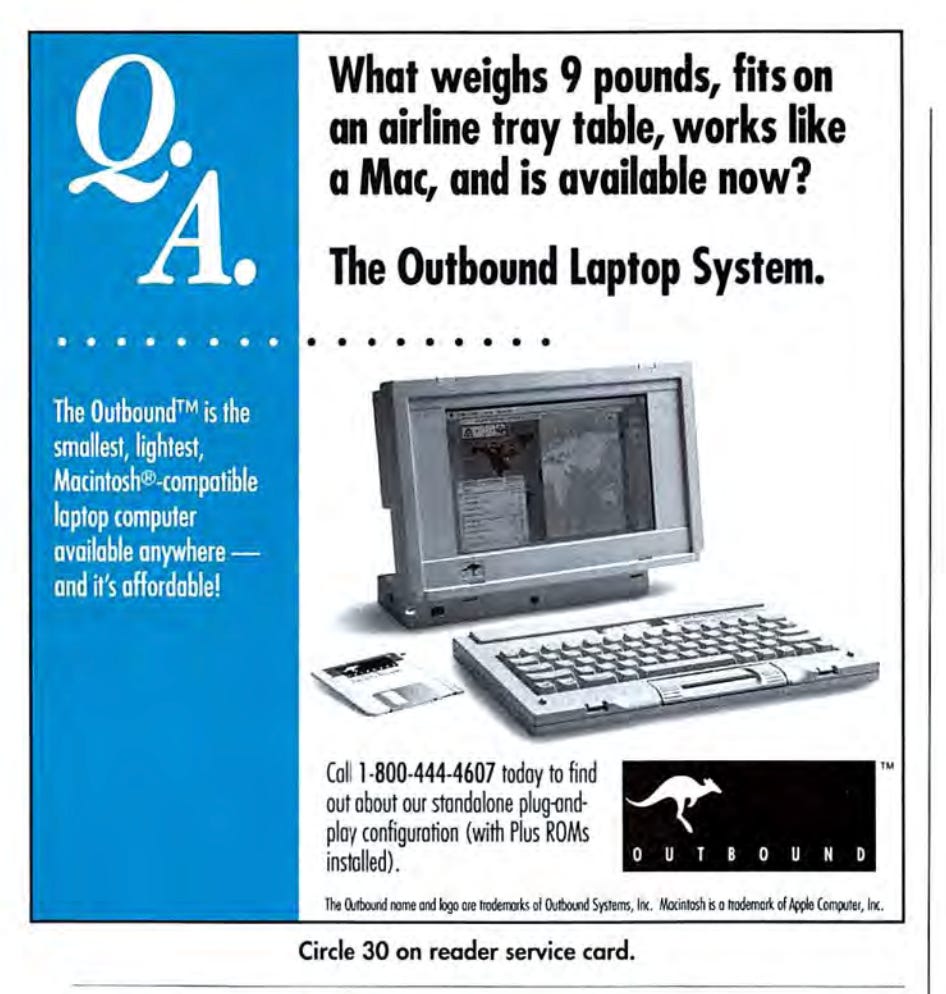
Presto! You now had a fully working Macintosh clone (which weighed nine pounds), and your SE or Plus was still usable as well. The purpose of the interface card and cable was so that you could plug the Outbound system into the Macintosh, which could then access the ROM chips and work as usual. Hence, the original “Wallaby” nomenclature.
When connected together, the Outbound’s backlit black and white display functioned as a secondary monitor to the Macintosh’s own display, and the Outbound’s (optional) 40 MB hard drive or floppy drive appeared as drives on the Macintosh’s own desktop. I say “or” because the original Outbound only had the space for one or the other, you had to pick the 40 MB hard drive or the floppy drive.
If you went with the hard drive (which made the most sense), then you needed to have the Outbound connected to your Macintosh in order to use its floppy drive to load or backup files.
The press favorably received the news of a new entry into the Macintosh portable market, and were impressed by what Outbound was claiming for its upcoming system.
Computerworld reported on it in March of 1990, saying “If Apple Computer, Inc.’s 16-pound Macintosh Portable has you fearing a hernia, the new nine-pound Outbound Macintosh Laptop from Outbound Systems, Inc. may be more your cup of tea.”12
Apple was not overjoyed with this new system, as one might imagine. There were noises of a lawsuit, but it appears that Outbound’s strategy of not providing an actual ROM provided enough of a legal shield that Apple’s lawyers couldn’t find an opening.
In August 1990, the New York Times reported that Apple had “given its blessing” for Outbound to keep selling its system, saying “Apple and Outbound officials declined to give the specific terms of their agreement, but the effect is that Outbound, phone (303) 786-9200, can now sell a Macintosh clone without fear of legal reprisal. Earlier, Apple had asserted that the Outbound system violated Apple’s intellectual property rights, since it is built around a proprietary Macintosh ROM (read-only memory) chip that is physically removed from a Macintosh Plus or SE computer and transferred to the Outbound portable.”13
It’s worth mentioning that although Outbound showed off the system in summer of 1989, and some sources say it hit the market in 1989, I cannot seem to find any hard proof of it. It looks like it wasn’t actually released until 1990.
An April 9th, 1990 article in InfoWorld stated that MacWorld attendees were going to get a chance to look at the “least expensive and lightest Macintosh portable on the market. And it’s not from Apple.”, and stated that beta testers were “singing its praises.”14
To me, that is pretty definitive proof that the laptop wasn’t available until sometime after the April 1990 MacWorld, although beta testers (of course) had their hands on it prior to that. My guess is that it was released in either May or June of 1990, since Outbound Systems would have wanted to follow-up a successful MacWorld showing as fast as possible.
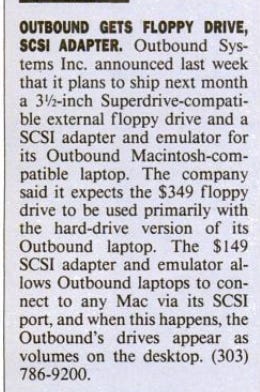
In August of 1990, Outbound released a 349 dollar external floppy drive, as well as a 149 dollar SCSI adapter and software package. The latter allowed a connected Macintosh (could be any Macintosh, not just one that had donated its ROM chip) to view all of the Outbound’s drives (including the new external floppy) as mounted volumes on its desktop.15
In this configuration the Outbound’s processor boosted both the RAM and the CPU performance of the connected Macintosh, albeit not as much as you might expect.
Although Outbound claimed that the connected Macintosh would see somewhere between a doubling and tripling of performance16, the reviewer for Portable Computing dinged Outbound for this, saying it was his “biggest disappointment” with the otherwise well-reviewed portable.17
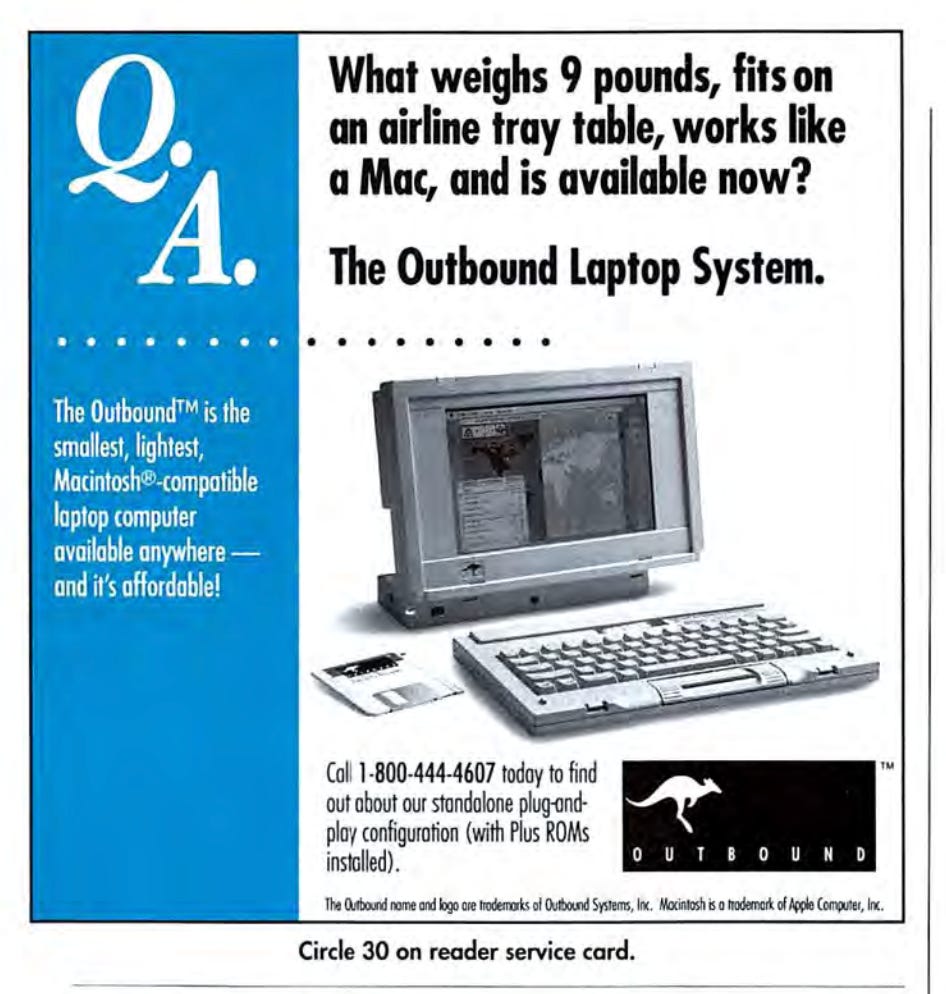
The Outbound’s keyboard is also a bit interesting, as it was detachable from the computer itself, and could be used either plugged into the Outbound or via infrared (the PCjr says hello). In the latter case, the range was apparently quite limited, with Portable Computing saying you could type “from several feet away”.18
Not that you were likely to want to view the 10 inch, 84 dots-per-inch, 640x400, passive supertwist screen from too far away. However the fact that it was backlit did give it another leg up over the non-backlit screen of the original Macintosh Portable model (there was a later Mac Portable revision that added a backlit screen).
It was, however, a dismal screen in basically every other respect apart from the backlighting though, with its slow refresh rate meaning there was lots of pixel ghosting from moving objects, or in Steven Levy’s words, “ (t)he display is all too often haunted by smeary ghosts of pixels past.”19
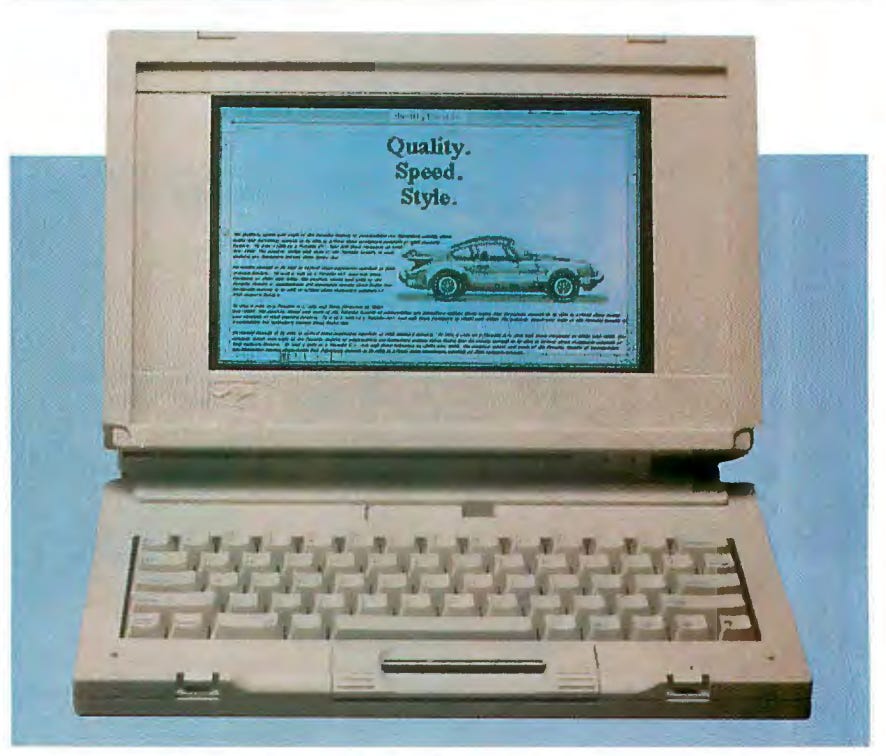
To handle moving the mouse around, Outbound used something they called the “Isopoint”, which was basically a cylinder that could be used like a scroll wheel to move the mouse pointer vertically, and slid left or right to move the mouse pointer horizontally.
Interestingly, the Isopoint wasn’t invented by Outbound, it was actually invented by a man by the name of Craig Culver, and was demonstrated under the name of Isopoint Control in 1989. Culver had spent five years working on the technology, building over a hundred prototypes and received three patents.20
It was technology that he took considerable (and understandable) pride in (and had licensed out to multiple companies including HP21), and he was apparently unhappy with Outbound’s implementation of the Isopoint, saying that they had done a poor job.
Outbound did put out a software update to try to improve the Isopoint, but according to Culver the root problem was actually mechanical, not the software. In 1991 he told Macworld that Outbound’s Isopoint was still just “not OK-mechanically it’s got problems”.22
It was a bit awkward to use, but reviewers seemed to feel that it worked well enough, once you put some time into mastering it. At this time the whole design of laptops was still very much in flux, and the Isopoint was a functional solution to the problem of controlling the mouse pointer.
Its biggest drawback was probably the fact that it took significant practice to easily move the mouse diagonally. This was because the Isopoint’s horizontal and vertical movement did not move the mouse by an equal amount, something some reviewers found frustrating.
Outbound did ship out all of its systems with a two-button Microsoft Mouse (seems to have connected via the mini-DIN port), so right out of the box you didn’t have to use the Isopoint if you didn’t want to. So long as you had the space to use a roller mouse of course.
The Outbound also used standard Panasonic camcorder batteries, and could get about three hours of light use on a charge. Not great by today’s standards, but about average for the day. Since it was a standard camcorder battery, it could be removed and charged using a standard camcorder charger, or left in and recharged while the Outbound was being used.
Now let’s talk about the need to acquire those Macintosh ROM chips. Outbound was officially very adamant that you needed to acquire those ROMs on your own, they could not help you with them.
However…as part of writing an article for MacWorld’s February 1991 issue, tech journalist Steven Levy called three different Outbound dealers (all of whom were Apple dealers, not just Outbound dealers), playing the role of some one who was interested in buying an Outbound, but didn’t want to buy a whole Macintosh just to get the ROM chip.
Ostensibly this was because he already owned a Mac II (a very powerful system, and one whose ROM was incompatible with the Outbound) and didn’t want to have to buy a weaker desktop such as an Macintosh SE just for the ROM.
Of the three dealers, the first one flat out offered to sell him an Apple ROM for 180 dollars and the second one cheerfully offered to sell a ROM to him for only 150 dollars extra. The third dealer technically abided by Outbound’s rules and wouldn’t outright sell him a ROM…but he did offer him a display model of the Outbound along with a display model of a Mac Plus for a considerable discount.
When Levy asked Outbound’s chief operating officer, Robert Louthan, about this behavior, Louthan’s glum (Levy’s word) response was that “the dealers’ instructions are to follow the installation procedure”,23 although he follows this up by admitting that this was basically optional, since Outbound had no way of forcing compliance.
Louthan did tell Levy that sales were outpacing Outbound’s projections, but without hard figures it’s hard to know how much or how little this meant. Its probably safe to say that it was selling fairly well for something that was a niche product (Macintosh) in a niche form factor (portable).
Its worth noting that a small paragraph on Outbound in MacUser’s August 1991 issue mentions that it had some some compatibility issues with some Macintosh software, although no details are given.
Overall, Outbound’s first venture into portable Macintosh computing was met with general approval, with Byte going so far as to say “[w]ithout mincing words, the Outbound Portable is a pretty darn good machine.”24
In response, in mid-1990 Apple slashed the Mac Portable’s price by a thousand dollars. This still left it at a painful 4799 dollars for the lowest configuration, one that didn’t even have a hard drive.25
Even with the additional expense of buying an older Mac for the ROM, the Outbound was still competitive enough to be attractive to a number buyers. Granted, this was because the Macintosh laptop market was hardly bursting with options, in stark contrast to the MS-DOS laptop market.
It is worth pointing out that it was possible to brick an original Outbound by trying to install the shiny new System 7 on it, as one Byte columnist, Don Crabb, discovered to his horror. In an article that ran in Byte’s October 1991 issue, Crabb recounted how his attempt to upgrade to System 7.0 had rendered his Outbound totally dead, forcing him to dig out his Mac Portable.
The end result was that Crabb’s Outbound was left so crippled that it couldn’t boot over AppleTalk, couldn’t boot from floppy, and the hard drive’s install of System 6 was unrecoverable due to the 7.0 installer trashing the System file.
Two months later Crabb had an explanation and an update, thanks to getting the opportunity to spend time with Outbound’s chief hardware designer, David Ferguson. The explanation was that, in Crabb’s words, “the Outbound laptop lacks a software-controlled, ejectable floppy Superdrive. What happens next is that the Outbound interprets the eject-disk command to mean “dismount the built-in hard drive.” Ouch!
When you pump in the Install 2 disk, the installation immediately fails, because the hard disk has gone away. Now it ‘s double whammy time. You can’t continue with the installation, and you can’t boot from the Outbound’s hard disk, because the Apple installer has already clobbered the existing System file.”26
The update was that Crabb had been forced to switch out his ROM for a new Macintosh Plus ROM, after which he was able to reformat the Outbound’s hard drive and reinstall System 6. At least I assume it was System 6, he doesn’t actually specify.
In spite of these issues, the Outbound Laptop System was overall at least a modest success, and had given Outbound Systems a foundation to build off of. They needed to work on some of the issues though, most especially the need for people to get their hands on a Macintosh ROM and then take it to a dealer.
Being able to sell systems that came with the correct Macintosh ROM already installed would make their systems far more attractive to interested buyers.
Fortunately, Outbound had a plan to make just that happen.
Outbound’s Follow-Ups
As 1991 dawned, Outbound was apparently shipping out its systems with a ROM included. According to the May 1991 issue of MacUser Outbound was accomplishing this by a very simple (and arguably clever) strategy.
Part of the price of your purchase included a Macintosh 512k, which Outbound would then immediately strip the ROM from, and then buy it back from you for 100 dollars. Except you never saw this donor Macintosh, the whole process took place within Outbound’s metaphorical walls.27
In June of 1991 InfoWorld ran a brief paragraph under the headline “Outbound Gets to Ship Mac ROMs”, that simply said that Outbound was now able to ship out systems with included ROMs from the Macintosh Plus.28
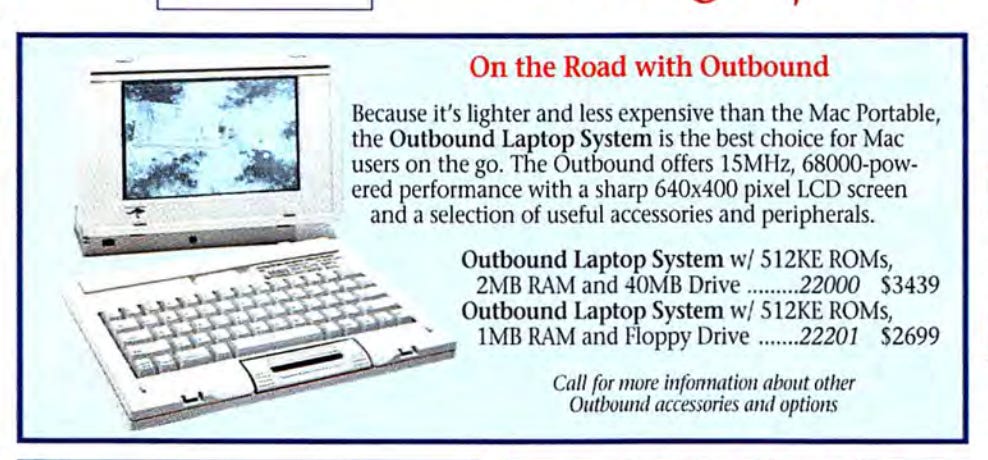
This was referring only to the original Outbound, which had a new price of 3,999 dollars for the complete package with an included Macintosh Plus ROM. Its probably a safe bet that this 3,999 dollar price included the aforementioned Mac 512k, meaning that your end price would be 3,899 dollars once Outbound bought the ROM-less 512k back from you.
However, at some point in either late 1990 or early 1991, Outbound somehow managed to pull off a major coup, working out a licensing agreement with Apple that allowed them to finally start buying ROMs from Apple for use in their systems, albeit older ROMs.
Details are extremely hard to pin down, with MacWorld reporting that the licensing agreement was “confidential and complex”, which is probably an understatement if anything.29
Writing for MacWorld in early 1991, Steven Levy stated that a former Outbound employee had told him that the major hidden piece of the agreement was Apple buying Outbound’s technology and then licensing it back to them for a period of no more than three years.30
At this point (February 1991), the fact that Outbound would also be able to acquire Macintosh ROMs directly from Apple was still not publicly known. The three year timeframe would make sense though, since in early 1991 Apple was hard at work on the first PowerBook models (the original trio of the PowerBook 100, 140, and 170), which were released towards the end of the year.
Assuming they sold as well as Apple was hoping (they did), Apple’s agreement with Outbound would let them basically choke it off within no more than three years. Which is, not to get to far ahead of the story, what happened.
But that was in the (near) future. Initially, the inclusion of ROMs of course had the effect of a significant price drop, since Outbound’s customers no longer needed to own or purchase a Macintosh to get a ROM chip.
Given Steven Levy’s report about Apple licensing Outbound’s technology (whatever that means) back to them for three years, as well as MacWorld stating that Outbound was able to get ROMs from Apple, my guess is that Apple only allowed Outbound to license older Macintosh ROMs, not newer ones. These older ROMs came with limitations (such as only being able to see 4 MB of RAM), and would only be viable for a limited amount of years.
Apple could thus be fairly confident that Outbound would be unable to last longer than a couple more years. I stress that this is pure speculation on my part, and as such, this part of the article may be revised in the future.
The first Outbound notebook had been a modest success in a market starved for a portable Macintosh, and Outbound quickly expanded their lineup, which they revealed at the 1991 MacWorld Expo.
This new family, collectively known as the Outbound Notebook Systems family, was favorably profiled in the November 1991 issue of MacWorld.31 Apple had only just released the initial PowerBook lineup, and it wasn’t yet clear that Outbound’s brief time in the sun was rapidly coming to a close.
The weight had dropped from 9 pounds to 5.7 pounds with only a floppy drive, and 6.25 pounds with the floppy drive swapped out for a hard drive.32 The reduction in weight meant Outbound finally (in my subjective opinion) offered true notebooks as opposed to luggables.
The Outbound 2000 series was comprised of three sub-models, starting with the new base model, the 2000/200. This retailed for 2,529 dollars and did not come with a hard drive. The next model up was the 2000/220, which had a 20 MB hard drive and retailed for 2,899 dollars, and finally there was the 2000/240, which came with a 40 MB hard drive and a cost of 3,299 dollars.
Next was the Outbound 2030 series, comprised of the 3,999 dollar Outbound 2030/400 and the 4,299 dollar 2030/460.
Lastly there was the top of the range 2030S, which was built around the 68030 CPU and had 4 MB of RAM (the maximum an Outbound system supported) The 2030S also came with a 68882 math coprocessor, supported virtual memory, and had a memory manager.
All of these models shipped with Apple ROMs preinstalled, usually from either a Plus or an SE.
The Outbound 2000 models had also changed out the original Outbound’s Isopoint for something called a “TrackBar”, a somewhat improved version of the Isopoint.
MacUser states that it was “a much improved version of its IsoPoint pointing device…it comprises two mouse buttons and a rolling bar that also moves sideways”.33
The new-and-improved TrackBar also found favor with Byte, with columnist Don Crabb stating that it was far superior to the trackball that the new PowerBooks used.34
Possibly there was also some sort of trademark on the name Isopoint necessitating a name change, details are scarce. The new Outbounds also all had a standard Apple ADB port and could use a standard Macintosh mouse, should you decide you couldn’t deal with the TrackBar’s idiosyncrasies.
The ROMs that came with Outbound’s family of systems seem to have been comprised of a mixture of Macintosh Plus, 512k, SE, and Macintosh Classic ROMs, which were all older Macintosh systems of course, with the Mac Plus originally being released back in 1986. However MacUser in February 1992 reported that Outbound’s systems came with only Mac Plus and Mac SE ROMs.
One possible explanation would be that Apple was only allowing Outbound to get Mac Plus ROMs, while they continued to source other ROMs through grey market purchases or other sources. I stress that this is a guess, information on which ROMs Outbound used, where they came from, and exactly what ROMs Apple licensed to them has so far been impossible to pin down.
This also meant that most Outbound systems were limited to a maximum amount of 4 MB of RAM, as that was the most that these older ROMs allowed the Macintosh operating system to address.35
Adding more RAM than that (which was pretty expensive) was possible, but on most Outbound systems, memory above 4 MB could only be used as a RAM disk, not actual RAM.
A RAM disk was actually a very important part of any of these early notebooks, whether Macintosh or DOS, as it allowed user to stretch their usually-meager battery life by treating part of their RAM as a a hard drive, obviating the need to keep the power-consuming mechanical hard drive or floppy drive spun up.
The 2000 and 2030 systems were all available by November 1991, with MacWorld reporting that the 2030S would start shipping before the end of the year. According to EveryMac, that promise was met, and the 2030S was released on December 1, 1991.
Byte magazine was so impressed by the 2000 line that in January of 1992 they gave it an award saying that “The first Mac-compatible notebook PC gets better.”36 Specifically it was listed under the Byte Awards category “Merit”, along with a number of other products such as the first Windows release of Lotus 1-2-3.
In early 1992 Outbound expanded their product line with a portrait monitor, called the Outrigger, or more formally, the Outbound Outrigger Intelligent Monitor. This was a 15” portrait monitor that connected via SCSI, and would work with any SCSI equipped Macintosh running System 6.07 or higher.37
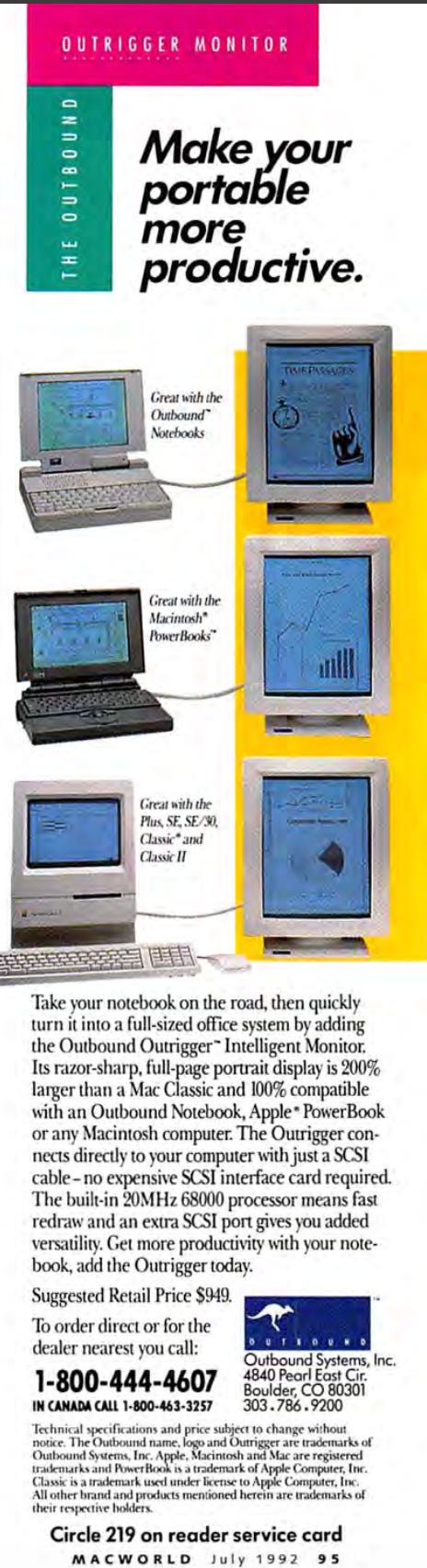
The Outrigger had a built in 20 MHz 68k CPU to aid in speeding up screen redraws, had its own SCSI port for connecting devices, and retailed for 949 dollars.
Or at least that was the price InfoWorld quoted in January of 1992, although by April 1992 MacUser was saying that the monitor should cost “around $700”.38 Then in December 1992, MacUser (as part of reviewing the Outrigger), said that it had a list price of 949 dollars and a street price of 800 dollars.
So far as actually buying an Outbound laptop, it seems that some authorized Apple dealers did carry them, but I’m betting most sales came via mail-order.
In 1992, MacConnection was the only authorized mail-order vendor carrying the Outbound. Now, this could be read as they were the sole one interested, or it could be read as they were the one picked to exclusively offer Outbound’s systems. MacConnection was a massive mail-order company, and is actually still with us today, albeit in a completely different form.
It now goes by the name “Connections” and does…”end-to-end technology solutions and services your organization, its people, and its customers need to function at their best. From digital workplace solutions to modern IT infrastructure and multicloud to supply chain and lifecycle, we have you covered”.39
Personally, I think focusing on just one mail-order company, especially one as large as MacConnection, was probably a smart move, and one that gave Outbound the best chance of mail-order success.
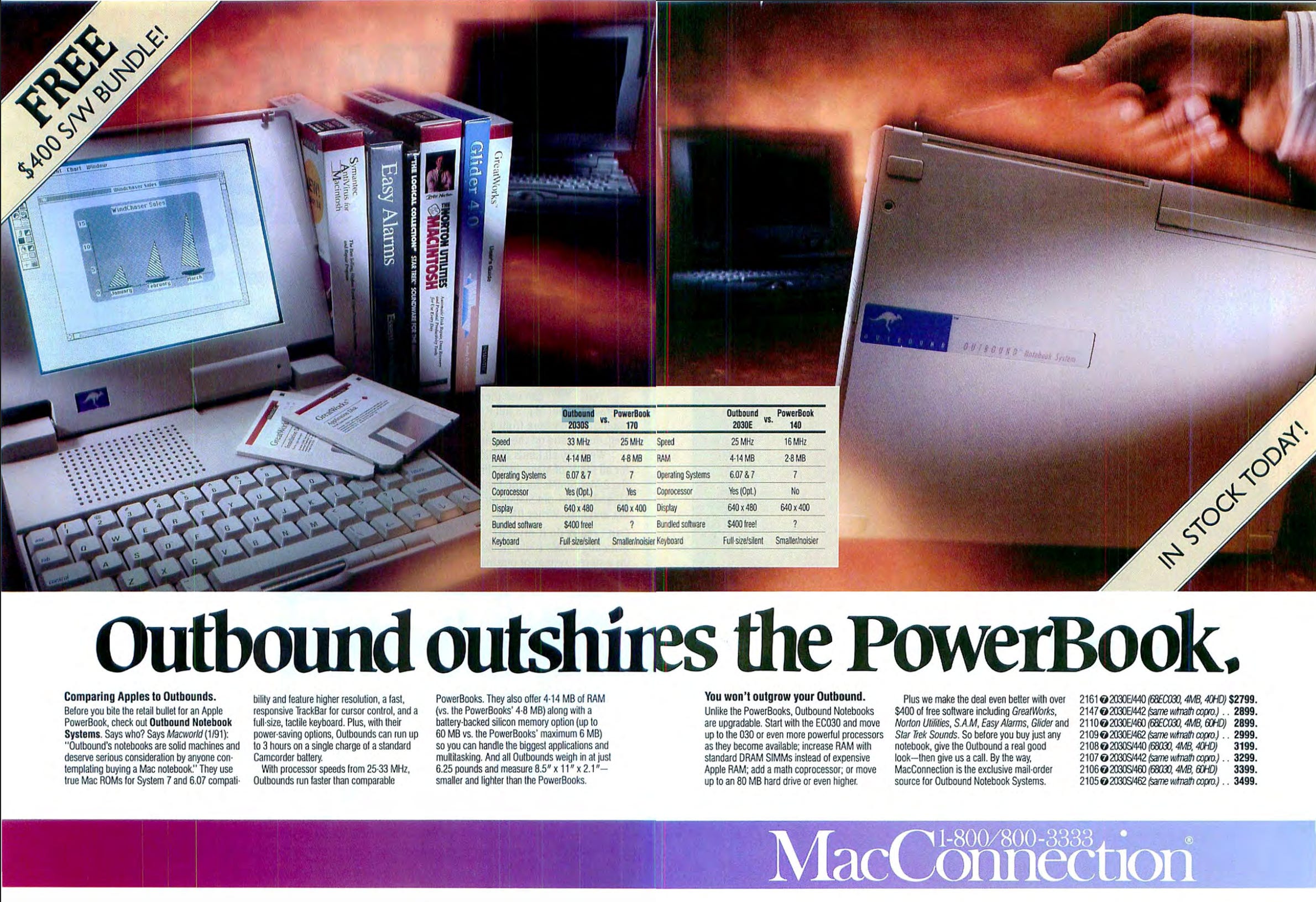
MacConnections took out a large two-page advertisement in MacWorld’s March 1992 edition, proclaiming the advantages of the Outbound family of notebooks, and boasting of the 400 dollars of free software they threw in with every Outbound purchase. Granted, the latter included some rather “optimistically valued” offerings such as Star Trek Sounds, and Easy Alarms, but also included the awesome game Glider 4.0, which was an awesome game that totally kicked my butt as a kid.
Price drops had occurred as well, with most of Outbound’s offerings dropping in price by hundreds of dollars. According to MacConnection’s advertisement, the top-of-the-line 2030S/462 was now retailing for $3499.
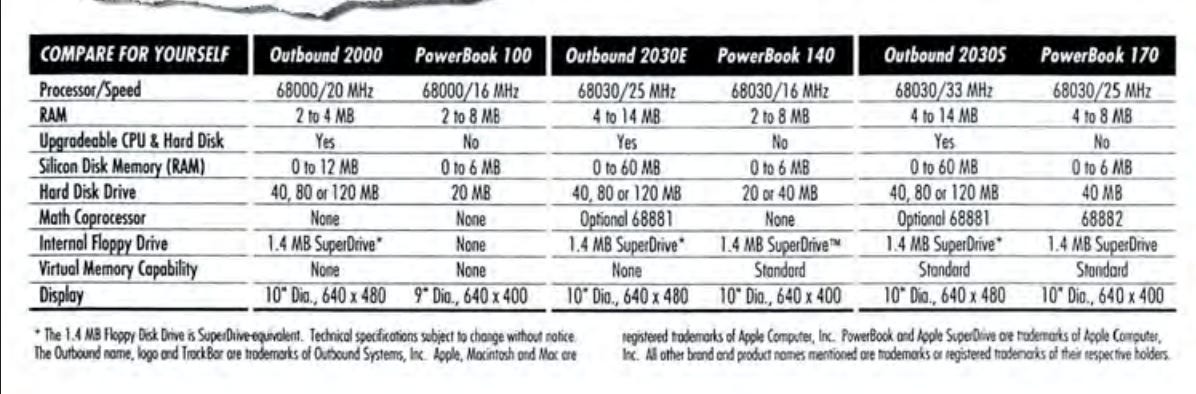
The final Outbound family had expanded to four models: the Series 2000, Series 2035, Series 2030E, and Series 2030S. CPUs ranged from the Series 2000’s 20 MHz 68000 to the Series 2030S’s 33 MHz 68030.
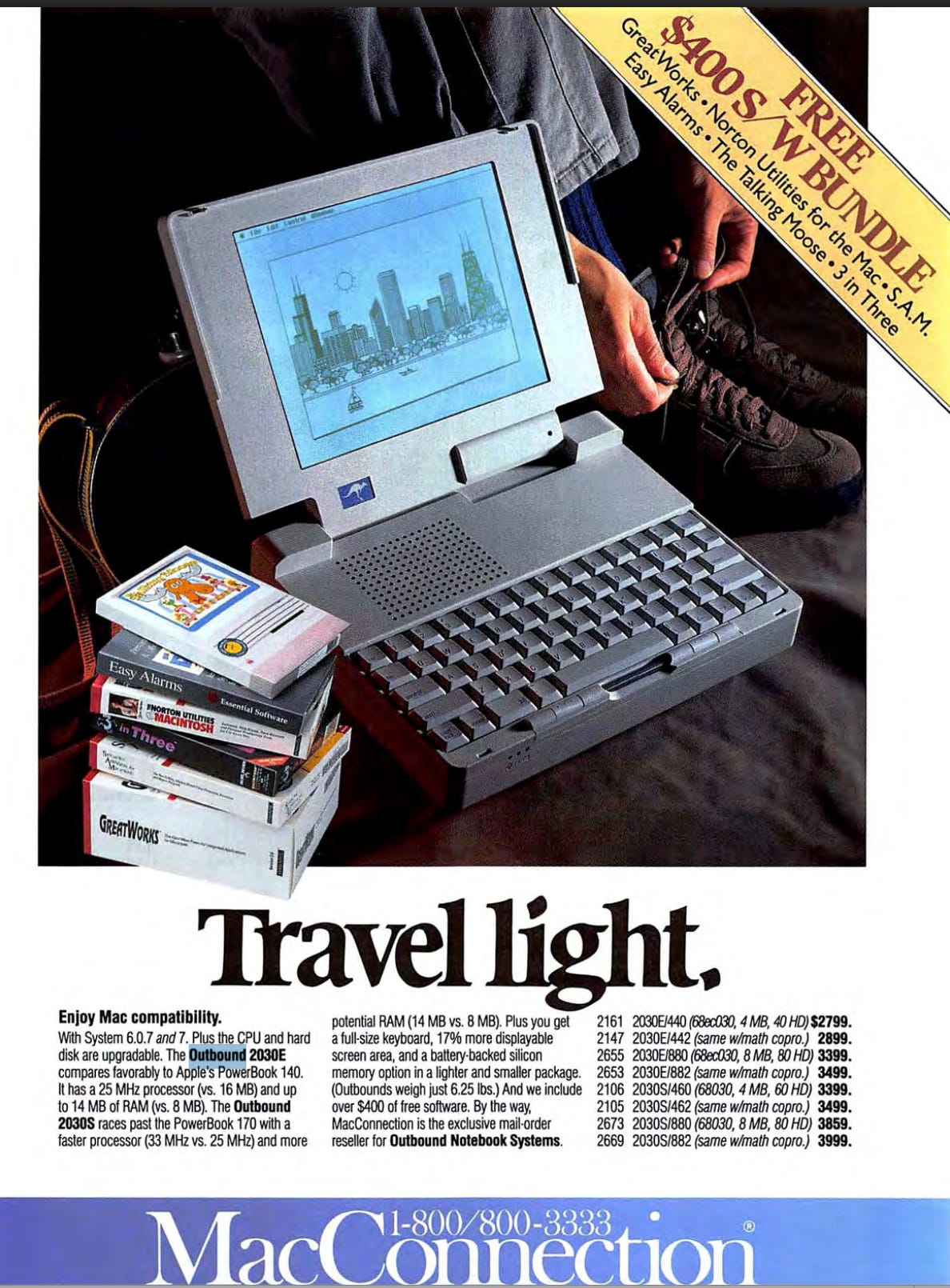
The 2030E was positioned directly against the PowerBook 140, with MacConnection touting its 25 MHz CPU and 14 MB of RAM (or rather “up to”) versus the 140’s 16 MHZ CPU and 8 MB of RAM. Granted, the base configuration MacConnection was selling in June of 1992, the 2030E/440, came with only 4 MB of RAM and cost $2799.
It’s worth noting that the 2030E seems to have been the first Outbound laptop that could use more than 4 MB of RAM, with its maximum RAM configuration a whopping 14 MB. I am honestly unsure how they did this and got around the limitations of the older Macintosh ROMs being used.
One possible answer lies in the fact that the Outbound 2030 is said to have had a custom EEPROM chip, which Outbound utilized to deliver software updates that patched or worked around limitations in the Mac Plus ROM.
The 2030 seems to have been the “base model” for the more advanced 2030E and 2030S, and thus they both probably had these EEPROMs as well. It makes sense that this was used to give the 2030E the ability to utilize 14 MB of RAM, but it doesn’t make sense that all of Outbound’s notebooks didn’t gain this ability.
It also seems that the 2030 got upgraded ROM chips at some point, with MacUser’s January 1993 buying guide (which actually came out after Outbound exited the business) stating “Unlike earlier Outbound laptops, the [2030] has up-to-date, standard Mac ROM chips preinstalled.”40
It doesn’t clarify what this means, so we are left to wonder if maybe Outbound was starting to use cannibalized ROMs from something like an LC II or a Performa 200.
Another useful feature for Outbound’s customers was the fact that all of these laptops still used a standard 99 dollars Panasonic camcorder batteries.41
Since Outbound didn’t use a proprietary battery pack, replacement or spare batteries could be purchased virtually anywhere that sold electronics. Battery life was around three hours (depending on how the laptop was being used of course), which was fairly comparable to Apple’s new PowerBooks.
Outbound had still managed to keep the weight down, with each of the four models weighing 6.25 pounds, as opposed to the original’s nine pound weight.
By the end of 1992 though, Outbound had a major problem, price. Apple’s new PowerBooks were crushing the laptop market, redefining what people expected from a laptop (not hyperbole, they really were a paradigm shift in many ways), and they were sometimes doing it for less than an equivalently specced Outbound system.
Outbound’s systems were still solid buys however, and according to a December 1992 MacWorld comparison the 2030S in particular beat the PowerBook 180 in every category for a thousand dollars less.42
But Outbound was also living on borrowed time. Their systems were one major incompatibility away from serious viability issues, which is why I suspect Outbound only shipped its systems Macintosh System 6, rather than the hot new System 7. It looks like Outbound’s systems did run System 7 decently, (albeit with some ROM patching needed via EEPROM), but it just was a safer bet to stick with System 6.
And that was a problem as Apple’s PowerBooks continued to fly off the shelves and they were coming with Apple’s hot new operating system version.
The Demise of Outbound Systems
Outbound’s niche had always a precarious one that would only last so long as Apple didn’t come out with a proper Macintosh portable of its own that didn’t have the drawbacks of the ill-fated Macintosh Portable.
Unfortunately for Outbound, Apple had not been blind to the need for an excellent Apple-created Macintosh laptop and had spent some time rethinking the Macintosh portable experience from the ground up. The fruit of this was the PowerBook line of portables, a genuinely innovative and exceptionally well-thought-out series of systems that hit the market in late 1991
The PowerBooks were well priced, well supported by Apple, and were an immediate success that absolutely hammered Outbound’s chances of maintaining their business. It seems that Apple also ceased licensing their ROM chips, forcing Outbound to start buying up older (and thus cheaper) Macintoshes such as the aging Mac Plus in order to, once again, cannibalize ROM chips.
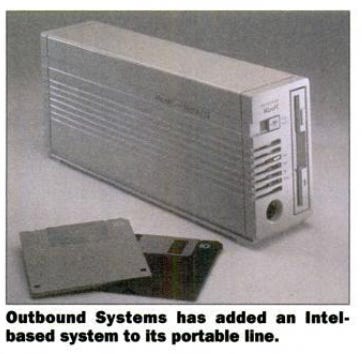
A short-lived pivot to making Windows portables followed, with Outbound Systems launching a line of small 486-based desktops called “MicroPC”. CEO Douglas Swartz told InfoWorld that with MicroPC, Outbound Systems had taken “all the things we’ve learned about Macintoshes and applied them to the PC”.43
The MicroPC lineup were small (for the day) rectangular desktops measuring 11.75 x 2.7 x 4.8 inches and weighed five pounds. Yes, these desktops were actually lighter than Outbound’s laptops.
These appear to have been aimed at the burgeoning network market, although Ethernet was an option, not standard. They could be ordered with Novell’s NetWare Lite peer-to-peer networking software, with hard drives up to 240 MB in size.
Since these systems were aimed at the business market, they could also be ordered with an optional microphone and speaker built-in,
The base configuration, with a 25 MHz 486, 2 MB of RAM, and an 85 MB hard drive was only 1,080 dollars, although it doesn’t seem like that included Ethernet. All systems shipped with a full keyboard and three-button mouse, and were supposed to start shipping in November 1992.
Honestly, the systems look rather neat in an early 1990’s PC sort of way, and I would love to have one.
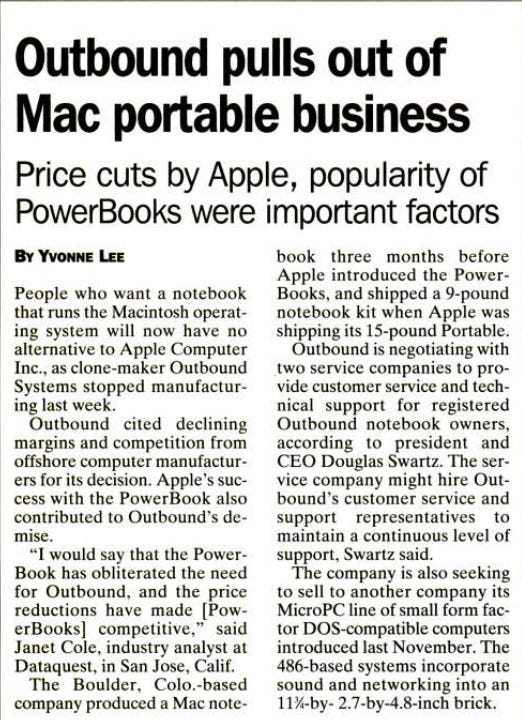
However the handwriting had been on the wall from the moment Apple released the first PowerBook. In December of 1992, InfoWorld ran a short news article titled “Outbound pulls out of Mac portable business”, that reported that Outbound had ceased all manufacturing the prior week.
It also quoted an analyst by the name of Janet Cole, who told InfoWorld that “…the PowerBook has obliterated the need for Outbound, and the price reductions have made [PowerBooks] competitive.”44
The article also said that Outbound was seeking a buyer for its MicroPC line of DOS systems, however it appears that they never found any takers for it. With no manufacturing, no viable alternative to its core business, and no takers for its MicroPCs, Outbound was sinking fast and only lasted about two more months.
Information Technology Digest carried the news in its February 15, 1993 issue, reporting that Outbound was five million dollars in debt, was unable to meet its payroll, and had been forced to cease all operations.45
Interesting, the article also claimed that “Outbound Systems gained a certain renown for selling the only Macintosh-compatible computers available from anyone other than Apple”, a statement which ignores several other varying successful attempts to create Mac clones (for example Dynamac and Colby Computers).
In spite of Outbound’s exit from manufacturing its laptops, the February 1993 issue of MacUser (and possibly other magazines as well) did carry an advertisement for Outbound’s portables.
However this was undoubtedly an ad that was paid for months prior to the company’s demise, and most likely anybody who called Outbound’s sales number (1-800-444-4607) as a result of it either didn’t get through or was unable to buy an Outbound.
In the end, Outbound burned briefly and brightly for somewhere between two and three years. I was unable to find any real sales numbers, but I think it’s safe to say their sales were decent for the narrow niche they were in, but never large.
On eBay, there are only a few systems for sale, and prices are all over the place, but never anything other than eye-watering (over 18,000 dollars?!). This is a pretty clear sign that there simply aren’t that many of these systems out there, which means the total number sold was probably fairly low.
They remain a fascinating footnote in the history of unauthorized Macintosh clones, one that deserves to be better known.
Thanks for reading! If you enjoyed this article, please leave a like and share. And if you had any experience with Outbound’s computers, I’d love to hear from you!
https://macgui.com/news/article.php?t=493
See list of ROMs: https://www.macintoshrepository.org/7038-all-macintosh-roms-68k-ppc-
“Send in the Clones”, MacWorld April 1991
“University Students Visualize Coursework with Intermedia”, InfoWorld, June 13, 1988
“Recycled Macs”, MacUser, March 1992
“Apple Delivers a True Mac With Its Pricey Portable” InfoWorld, October 23, 1989
“Outbound and Gagged”, MacWorld, February 1991
See: “On the Move”, InfoWorld, January 21, 1980
“Outbound”, Computerworld, March 26, 1990
See Computerworld, December 1991
“Tip of the Month: the Outbound Portable”, Byte, June 1991
“Outbound’s light laptop acts as two Macs in one”, Computerworld, March 26, 1990
“PERSONAL COMPUTERS; A 9-Pound Mac Clone”, New York Times, August 14, 1990
“Outbound to Show Light Mac Laptop”, InfoWorld, April 9, 1990
“Outbound Gets Floppy Drive, SCSI Adapter”, InfoWorld, July 23, 1990
“Outbound”, Computerworld, March 26, 1990
“The Outbound: New Solution to Mac Portability”, Portable Computing, September 1990
Ibid
“Outbound and Gagged”, MacWorld, February 1991
“Isopoint Control Poses Alternative To Mouse”, InfoWorld, July 17, 1989
Ibid
“Outbound and Gagged”, MacWorld, February 1991
Ibid
“Tip of the Month: the Outbound Portable”, Byte, June 1991
“Nanobytes”, Byte, July 1990
“Making Yourself Truly Mac Portable”, Byte, December 1991
“Outbound rebound”, MacUser, May 1991
“Outbound Gets to Ship Mac ROMs”, InfoWorld, June 1991
“Send in the Clones”, MacWorld, April 1991
“Outbound and Gagged”, MacWorld, February 1991
“Outbound Ships Notebook Macs”, MacWorld, November 1991
Ibid
“Outbound Notebook 2030”, MacUser, February 1992
“Making Yourself Truly Mac Portable”, Byte, December 1991
“OUTBOUND NOTEBOOK SYSTEM”, MacWorld, December 1991
“Byte Awards: Merit”, Byte, January 1992
“Outbound notebook speeds past the PowerBook 170”, InfoWorld, Jan 20, 1992
“Power Tools”, MacUser, April 1992
https://www.connection.com/solutions-services?cm_sp=MegaMenu-_-Solutions-Services-_-Solutions-ServiceCenter
“Outbound Notebook 2030”, MacUser buying guide, January 1993
Source for Panasonic battery is “Outbound Notebook 2030”, MacUser, February 1992
“New PowerBooks: The 145, 160, and 180”, MacWorld December 1992
“Outbound offers network-ready PC”, InfoWorld, November 9th, 1992
“Outbound pulls out of Mac portable business”, InfoWorld, December 14, 1992
“News from MacWorld Expo”, Information Technology Digest, February 15th, 1993